
July 15, 2026
How to Build an Etsy Catalog Feed for Instagram and Google Shopping
Set up one Etsy feed URL for Instagram Shop and Google Shopping, then keep both catalogs synced without manual uploads.

If your Etsy listings are already stable and you want them to show up in Instagram Shop and Google Shopping without exporting product files by hand, Catalog Generator for Etsy is the simplest path I found. It gives you one reusable feed URL, and that URL is what you point Meta Commerce Manager and Google Merchant Center at. The app is $5/month after a 7-day free trial, so the setup cost stays low compared with maintaining a manual export.
If you want to watch the setup first, the vendor walkthrough is Link your Etsy listings with your Instagram Account and Facebook Page. The current Meta and Google help docs still describe this as a data feed or scheduled fetch workflow, which is exactly what we want here: one URL that both systems can poll on a schedule.
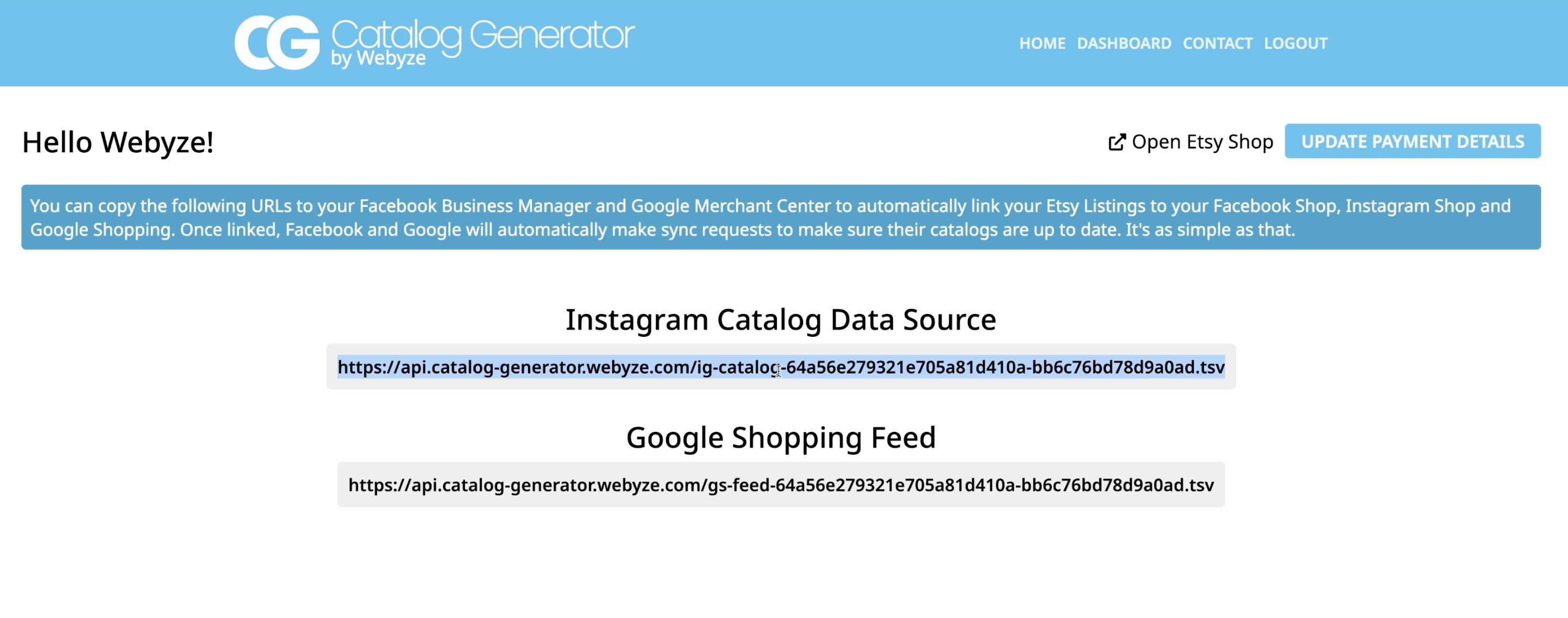
1. Open Catalog Generator and get the feed URL
Go to Catalog Generator for Etsy and connect the Etsy shop you want to publish. The goal here is not to build a catalog file yourself; it is to get the feed URL the app generates for your shop.
Expected result: you can copy a public feed URL that stays valid while the app is connected.
2. Verify your Etsy domain in Meta Business Settings
Before Commerce Manager accepts your catalog, Meta needs to see that you control the shop domain. Open `business.facebook.com`, go to Business settings, then Brand safety and suitability > Domains. Add the Etsy shop domain shown in your shop URL, then copy the verification meta tag into Etsy Shop Manager > Settings > Facebook Shops and verify it.
Expected result: your domain shows as verified in Meta Business Settings.

A small detail that trips people up: verify the exact shop domain, not a page URL or listing URL. If verification fails, re-copy the domain string from the Etsy shop address and try again.
3. Create the catalog in Commerce Manager
Open Commerce Manager, create or open the catalog you want to use, and choose Data feed or Connect to a data feed instead of manual item entry. Meta’s current help docs still frame this as a catalog connected to a data feed, with scheduled uploads available for refreshes.
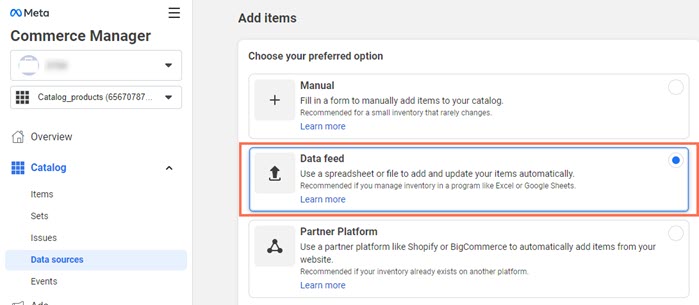
Expected result: the catalog is ready to accept a feed URL rather than individual uploads.
4. Paste the Catalog Generator URL and schedule updates
Paste the feed URL from Catalog Generator into the feed URL field. Leave optional fields empty unless your setup requires them, then choose a schedule. Daily is a reasonable default if you change Etsy inventory often.
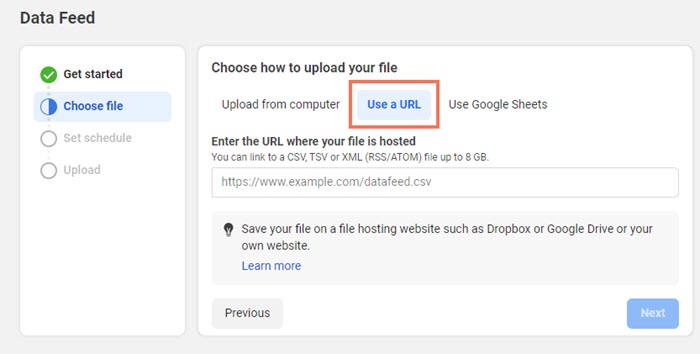

Expected result: Commerce Manager starts pulling the Etsy feed on a schedule and the catalog updates without you uploading files by hand.
If Meta rejects the URL, check that it is a direct feed URL, not a web page, and that it starts with `https://`. Meta and Google both expect a fetchable feed endpoint.
5. Add the same feed to Google Merchant Center
Google Merchant Center follows the same pattern. Go to Data sources, add a product source from a file, then choose the option to enter a link to your file. Google’s help says scheduled fetches retrieve your product data at regular intervals, and the URL must point directly to the data source.
Expected result: Merchant Center can fetch the same Etsy feed on a schedule and keep the Shopping catalog current.
6. Confirm the first sync and check the product list
After both systems fetch the feed, open the product or data source views and confirm the item count looks sane. On Meta, the catalog should show the products you expect. On Google, the data source should show a successful fetch and the products should be processing.
Expected result: you can see items in the catalog and you do not need to keep uploading new files manually.
7. Keep the feed healthy
Once the system is live, the maintenance loop is simple: update titles, stock, images, and pricing in Etsy, then let the scheduled fetches pick up the changes. If a product gets rejected, check Google’s product data requirements and Meta’s catalog data specs before changing the app or rebuilding the feed.
If you are still cleaning up listings before you wire this in, these two guides help:
- How to Update Etsy Listings in Bulk Without Breaking Variations
- How to Bulk Edit Etsy Listings and Variations Safely
If you want the broader version of this same workflow, How to Sync Etsy Listings to Instagram and Google Shopping covers the same end state from a different angle.
For the current platform wording, these official references are the ones I checked while writing the guide:
- Meta help: Upload products to your catalog with a data feed
- Meta help: Scheduled data feed uploads for catalogs
- Google Merchant Center: Scheduled fetches
- Google Merchant Center: Update your product data source on a schedule
Bottom line
Catalog Generator works because it turns Etsy into a feed source instead of a manual upload job. That keeps Instagram Shop and Google Shopping in sync, and it makes the catalog much easier to maintain over time. If you want to try it, start with the free trial and follow the vendor walkthrough to confirm your first sync.